Ground-penetrating radar
Theory
(text)
For further details, see script of lecture Angewandte Geophysik II from Georg Kaufmann.
Material properties
electrical conductivity \(\sigma_e\) [\(\Omega\)m].
dielectric permittivity \(\epsilon_r\) [-].
Instrument(s)
SIR4000: Processing unit
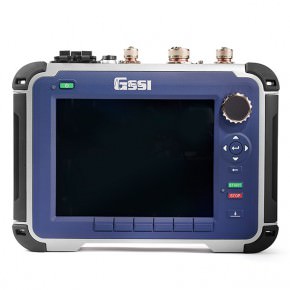
SIR4000, photo GSSI
100 MHz-antenna: monostatic antenna
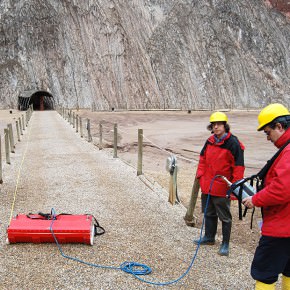
100 MHz mono-static antenna, photo GSSI
200 MHz: bi-static antenna
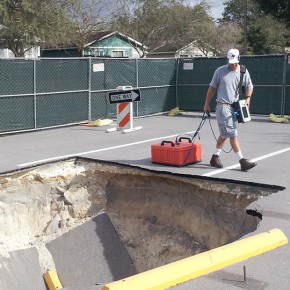
200 MHz bi-static antenna, photo GSSI
Assembly
Important: Do not insert battery, until all cables are connected!
Lay out antenna, attach survey wheel (possibly the metal clamps need to be re-attached).
Connect survey-wheel cable to antenna.
Connect antenna cable, one side to antenna, the other side to SIR4000.
Insert battery into SIR4000 unit and switch on.
Configuration
Choose antenna type from menu below.
Start new survey / project. Define name (and storage place).
…
Field measurement
Important: Two persons are needed!
Calibrate the survey wheel, if you are not sure is the recorded distance is ok.
One person drags the antenna. Make slow, gentle progress, antenna should not be tilted and should not jump. If the SIR4000 unit beeps, the speed is to high for data processing.
One person carries the SIR4000 unit with shoulder harness. The antenna cable should not touch the ground.
The screen on the SIR4000 unit displays a pseudo-moving profile, with distance running …
start profile measurement by pressing the green button. The screen turns blue, and once the antenna is moved, the distance bar starts moving. The actual profile record is displayed as file number on top.
stop profile recording by pressing the red button long (longer than 3 seconds). The unit should ask you, if you want to save the profile. Once you press ok, the unit directly initiates the new recording mode.
Data download
Use USB stick to download data. Insert USB stick into SIR4000 unit. Go to menu Playback. Choose project, then either mark single profiles, or all profiles, and press copy to USB.
Post processing
Important: Package Reflexw is used for post processing!
Open Reflexw.
The program asks for a directory, where it can find data. In this directory (which you can define), there should be a folder ASCII. In this folder, the files downloaded from the SIR4000 unit should be stored (
*.DZXand*.DZT).Other folders will be created by Reflexw, if they do not exist (ROHDATA, PROCDATA, LINEDATA, MODEL).
Import:
Open the dataimport window (either under File or import button).
As format specification, use RADAN with new 32 bit floating point.
As filename specification, choose original name.
If topography and coordinates are read in, under update traceheaders, choose use data folder and then WKSTRANS-GPS from dropdown menu.
Press Convert to Reflexw, then you will be prompted for a filename to import.
Filter:
STATIC CORRECTION: time cut
1D: dewow (15 ns)
2D: background removal
GAIN: manual gain (y)
2D: stack traces
…
Export:
File -> export: ASCII-4COLUMS, choose traceheader coordinates, then filepath to procdata, and press start.
Georeferencing
We need to add coordinates and elevations for all traces to achieve a proper geo-referenced data file. This coordinate information needs to be added before we process the GPR profile, as the topographical information influences the processing.
See section on coordinate proesssing!
